
Can Someone Find Your Location From a Photo? We Sent One Through 4 Apps
Photos can carry your exact location inside the file. We sent one test photo through WhatsApp, Telegram, Gmail and Google Drive to see what survives.

Key takeaways
- Photos can contain information such as date, time, location and phone for the photo. This information is called metadata or EXIF.
- A test was carried out using WhatsApp, Telegram, Gmail and Google Drive. If the photo was sent as a photo via either WhatsApp or Telegram the location information would be removed. However if the photo was sent as a file all information would be present.
- Cloud or email attachments enable the original file to be preserved and location information to be accessible by the receiver.
- Location information can also be gathered from a photo without the use of metadata. Inspect the background of the photo.
The contents of photos are often examined but the information contained within the photos is less often examined. When taking a photo on your device a small amount of information is also stored with the photo and this can be transferred when the photo is sent. This information is added by your device to all photos that are taken.
What is photo metadata?
Metadata within photos is data contained within the photo but not part of the actual image within the photo. The most common format for this is EXIF. This data is inserted by the photo taking application within the camera or mobile at the time the photo is taken. This data is typically not displayed by default within the gallery as the current implementation does not show the photo metadata.
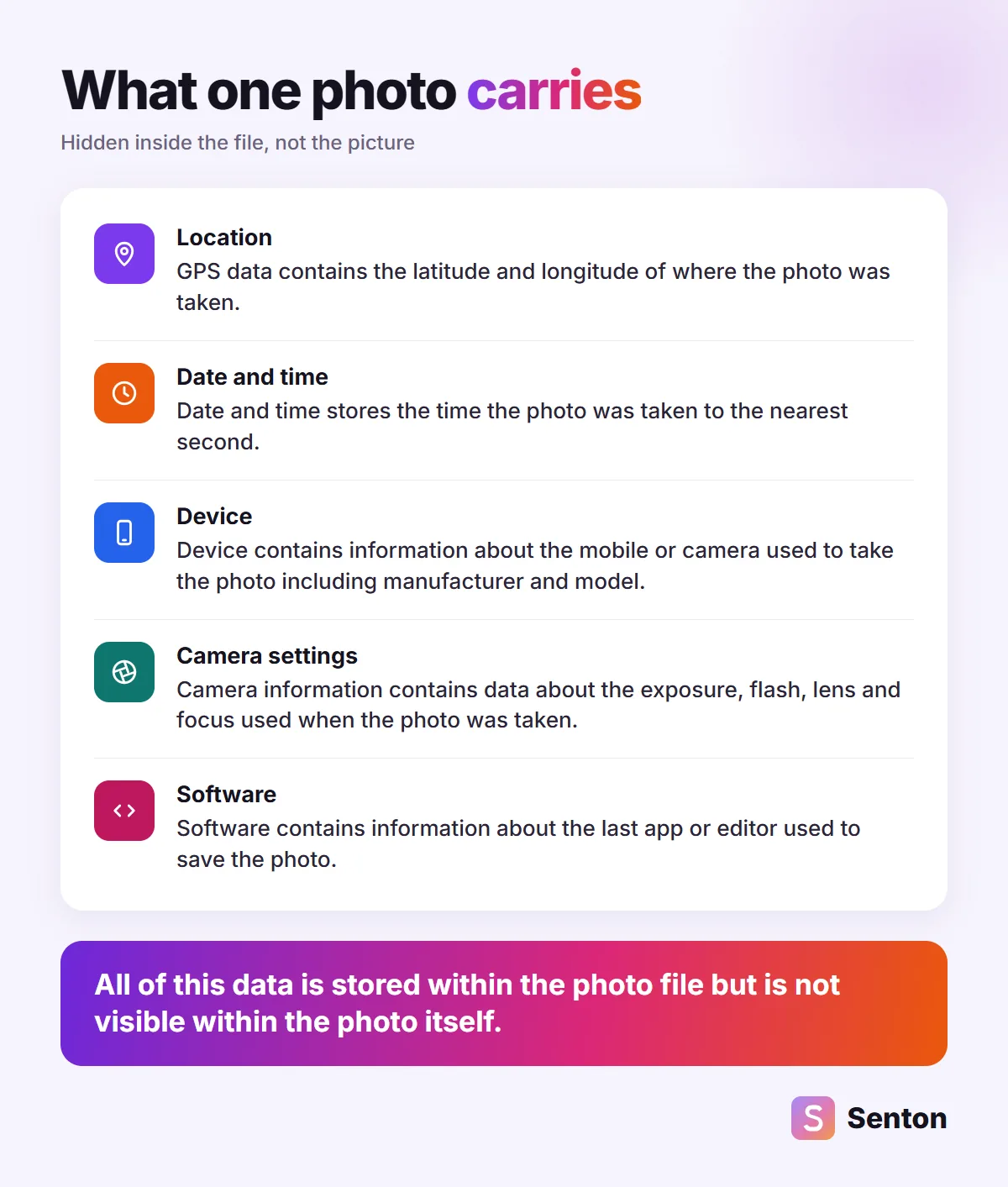
Can someone find your location from a photo?
Location data is very accurate. In the example photo above, location data was stored to five decimal places in both latitude and longitude. This level of accuracy can be sufficient to determine the location of a specific building. By using these figures in a mapping app a marker can be placed at the location of the photo.
This can be a problem in domestic, educational or workplace environments as photos can be used to determine the location of an individual if location data still exists within the photo. For example a photo of a child in a group chat or a photo of a new sofa available for sale can all be used to determine the location of the owner if location data still exists within the photo.
We sent one photo through 4 apps
We tested photo sharing on the 3rd of November 2026. A test photo was made with a fake camera name, a date and a location in a public area of Dubai. The photo was then shared using the web interfaces of 4 services to our own accounts. For each service we then recorded the content that was produced.
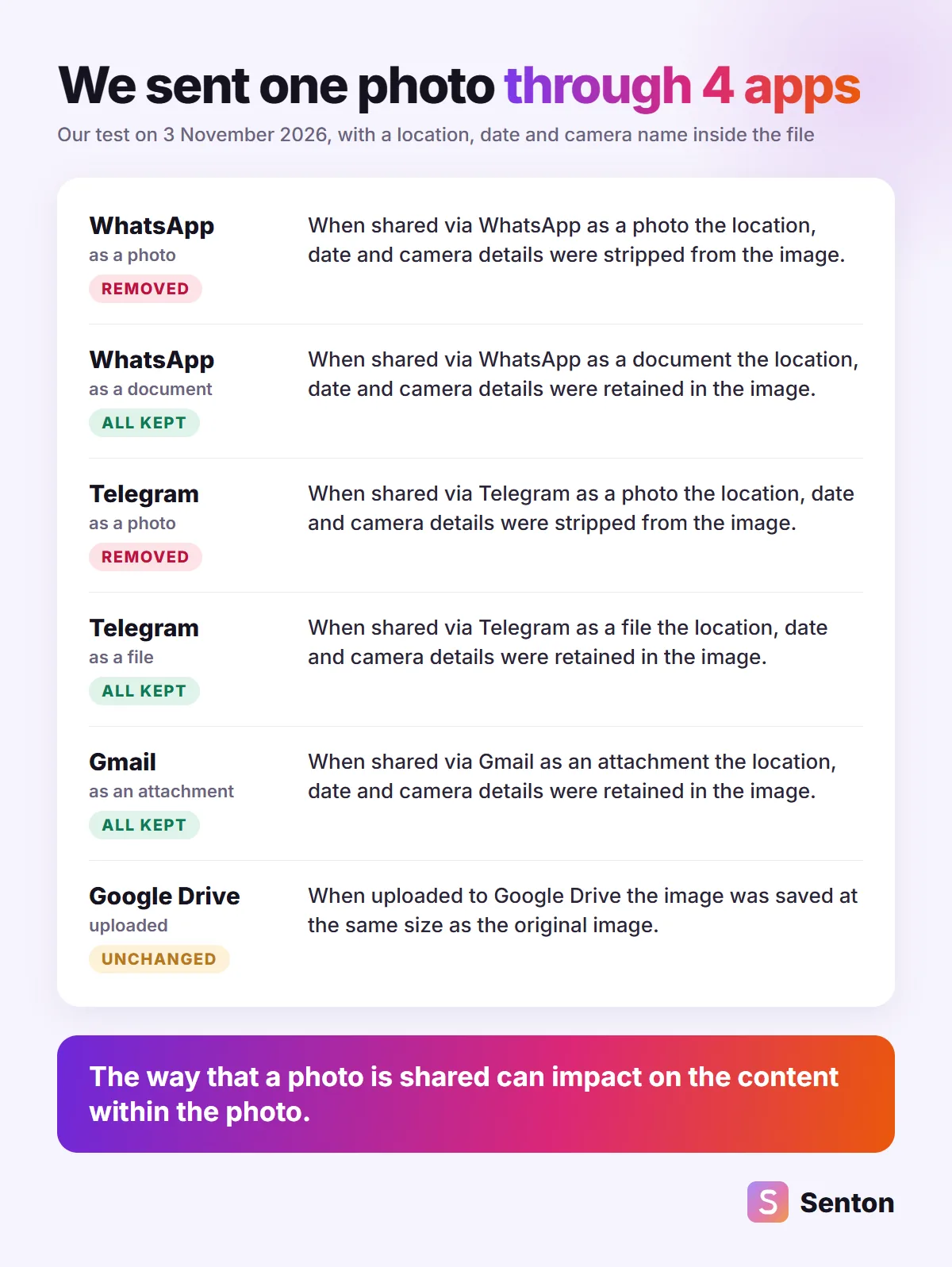
It seems that when a photo is shared as a photo it is compressed and all extra details are removed from the photo. When shared as a file the original file is shared and location data is retained.
Photo or file: the choice that decides it
Photos can be sent as a file or document to preserve quality. This could be useful for sending a photo of a car, property or an important file. The impact of this has been looked at. Photos can be sent using Telegram and WhatsApp. Location, date and camera information is also sent to the receiver.
Email and cloud storage keep everything
Cloud and email services can also be similar to sending as a file. Gmail received our file as sent and location information is sent. Google Drive receives the file at the original size and any people you share it with will receive the original file including location information. A link to a folder containing holiday photos can be shared to effectively show the location of those holidays.
What a photo gives away without metadata
Stripping location information can be a good first step but the photo itself can also show location.
- House number, shop name or road sign
- A unique shot from a window, building or landmark
- Car window, mirror or glasses which can show location
- Scenery that can be analysed using AI to show location
How to check a photo's metadata
You can preview image information prior to sharing. On iPhone open the image and swipe up to view camera and location information. On Android open the image in Google Photos and swipe up. On Windows right click the image and select Properties then Details. On Mac open the image in Preview and select Show Inspector.
How to share a photo without its location
-
 Share without location on iPhone
To share on iPhone share the image and at the top of the share menu tap Options and switch off Location. Location Not Included will now be available in the share menu.
-
 Turn off location for your camera
To prevent location information being recorded in new images turn off location in the camera. On iPhone this can be done by navigating to Settings > Privacy and Security > Location Services > Camera and switching to Never. On Pixels switch off Save location in the camera menu.
-
 Strip the data on a computer
On Windows switch off all location information in the image properties by navigating to Details and then Remove Properties and Personal Information. A copy of the image without location information can be saved whilst the original image is retained.
-
 Send it as a photo, not a file
If full image quality is not required sharing as a regular image (the only share option available in Telegram and WhatsApp that removes location information during testing) can be used.
Does a VPN hide where a photo was taken?
No. There is a difference in location types here. Using a VPN hides your IP but allows only an estimate of the location of the server hosting the VPN and not your actual location. GPS information embedded in photos is however stored within the photo itself. The location a photo was taken can then be accessed by any user who accesses the original photo whether or not a VPN is in use.
Photo metadata myths
-
Myth
WhatsApp and Telegram always remove photo locations.FactNo. If a photo is sent as a photo in WhatsApp and Telegram the location data will be stripped. If however the photo is sent as a file or document then the location data will be retained.
-
Myth
A screenshot is always safe to share.FactA screenshot of a photo will not include the location data from the photo but may include any text or map visible on the screen.
-
Myth
No metadata means no clue to where you are.FactLocation data will be stripped from a photo however there may be indications of a location from the contents of the environment, reflections or other features in the photo.
Where Senton fits
These tests are being performed by Senton. It is useful to be aware of the data within the data leaving a user’s device. We are currently developing Senton Mail which will be an inbox implementing end-to-end encryption for all private messages. Whilst location data can be encrypted during photo transfer in transit, this will not remove location information within a photo. For this reason it may be useful to be able to view a photo prior to adding it to a message.
The bottom line
- Photos can contain date, location and device information from the user's device.
- Location data has been stripped from photos in WhatsApp and Telegram however location data is retained in documents and files.
- Using Google Drive and Gmail the complete data from the original file is retained.
Frequently asked questions
For WhatsApp when a photo is sent the date, camera and location information is removed from the photo when it is transmitted (in our tests). When the same photo is sent as a file all such data is retained within the file.
This also exists within Telegram. When a photo is sent as an image the location data is removed when the photo is sent (in our tests). When the photo is sent as a file however the location, date and camera information is retained.
If location data exists within the photo. Location data may be stored within GPS data within the photo. This location data may then be accessed by someone who views the photo and used to determine the location. If no location data exists within the photo the location may still be determined using content within the photo.
Partly yes. A screenshot will capture the contents of the screen at the time the screenshot is taken but does not capture location data from the original photo. A screenshot will however capture a photo which reflects the contents of the screen at the time of the screenshot but with no location data.
Yes. EXIF is the most commonly used metadata within images. It may contain data such as date and time, camera details and location (if location is turned on).
No. A VPN masks your IP address but does not mask the data contained within the files that you send.